Settings
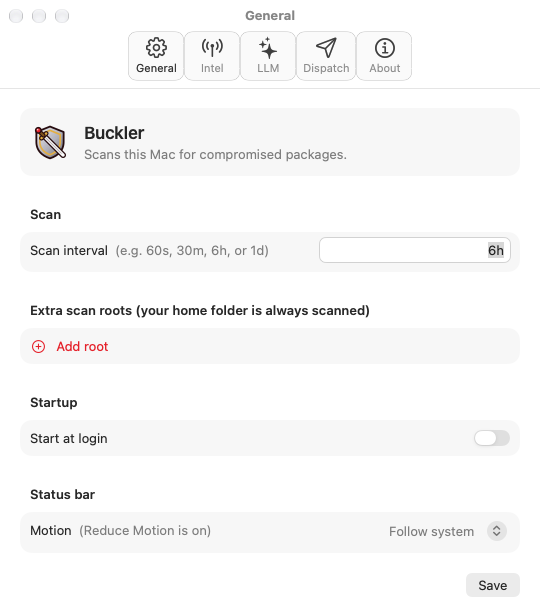
Open Settings from the menu (⌘,). The window has a toolbar with five panes: General, Intel, LLM, Dispatch, and About. The window title is the name of the pane. The window height fits the pane.
General, Intel, LLM, and Dispatch each have a Save button. Save writes config.toml and reloads it. The pane shows “Saved” when the write works. When a value is not valid, the pane shows a message under the field and writes nothing. When a write fails, the pane shows the reason.
Save writes the whole file. It keeps every runner that you added under [dispatch.runners]. It does not keep comments or keys that Buckler does not know. See config.toml.
General
Scan interval
How often Buckler runs a full inventory scan. Default: 6h. Enter a number and a unit: 60s, 30m, 6h, or 1d. The example shows next to the label. Any other text is refused.
Extra scan roots
Folders to scan beside your home folder. Default: none. Select Add root and enter a path. Select the minus button to remove a path.
Start at login
Whether Buckler opens when you log in. Buckler registers through SMAppService. When macOS needs your approval, the pane tells you to approve Buckler in System Settings › General › Login Items.
Status bar motion
Whether the status bar item animates. Three options:
- Follow system: obeys the macOS Reduce Motion setting (default)
- Always animate
- Never animate
This option takes effect at once. It does not need Save.
Intel
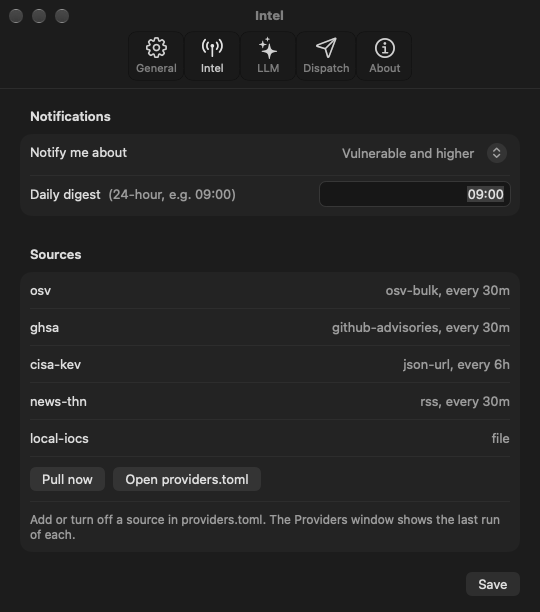
Notify me about
The lowest tier that sends a notification:
- Compromised only
- Exploited and higher
- Vulnerable and higher (default)
- Host change and higher
- All findings
Lower tiers still show in the Findings window. They send no notification.
Daily digest
The local time of the daily digest, in 24-hour time. Default: 09:00. Buckler accepts 9:00 and stores 09:00.
Sources
The list of intel sources from providers.toml, with the type and the interval of each. Pull now polls all sources. Open providers.toml opens the file. The Providers window shows the last run of each source.
LLM
Provider
Anthropic, OpenAI-compatible, Claude CLI, or None. Default: Anthropic.
Model
The model name. Default: claude-sonnet-5-5.
Base URL
The API endpoint. Leave it empty for the provider default. Enter a URL for a local server, such as Ollama or LM Studio.
Daily token limit
How many tokens the LLM can use per day. Default: 200000. Triage keeps a reserve so alerts still get explanations.
API key
Paste a key and select Save. Buckler stores it in the Keychain as buckler.llm. The pane shows whether a key is stored. config.toml never holds a key.
To set the key from the CLI:
buckler llm set-keyDispatch
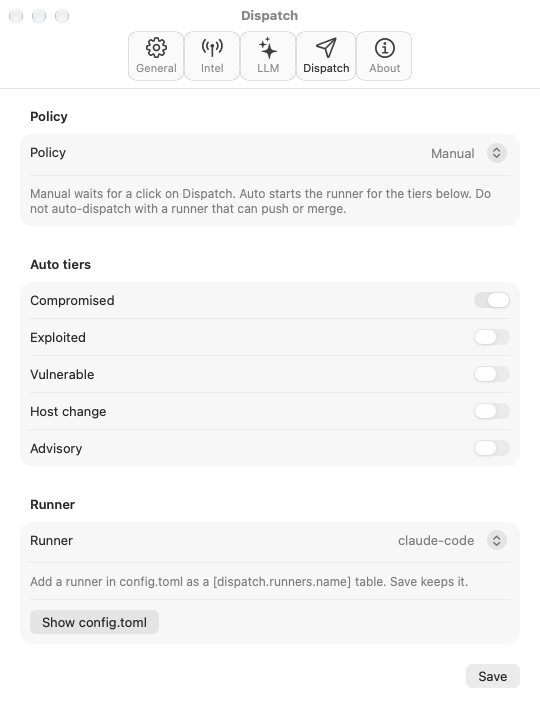
Policy
Whether Buckler starts a dispatch by itself. Two options:
- Manual: every dispatch needs a click (default)
- Auto: Buckler dispatches the tiers that you select under Auto tiers
Do not set Auto with a runner that can push or merge. A poisoned intel record can then change your repositories.
Auto tiers
The tiers that dispatch when the policy is Auto. Default: Compromised. The switches are off when the policy is Manual.
Runner
The runner that Dispatch uses. Default: claude-code. The list shows every runner in config.toml, including the ones that you added. Show config.toml reveals the file in Finder.
To add a runner, edit config.toml:
[dispatch.runners.claude-code]
command = ["claude", "-p", "--permission-mode", "acceptEdits", "--add-dir", "{project}",
           "Read {task}. Harden this project on a new branch. Do not merge."]

[dispatch.runners.codex]
command = ["codex", "exec", "--cd", "{project}", "Read {task}. Harden this project on a new branch."]
Placeholders:
{task}: path totask.json{project}: affected project directory
About
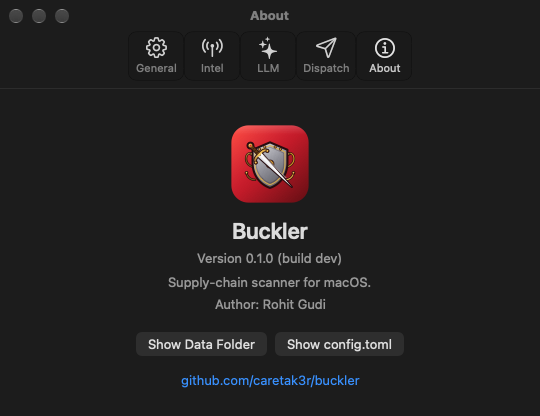
The About pane shows the app icon, the version, the build number, and the author. The build number comes from the build of the app bundle. A build from the source tree shows dev. Show Data Folder opens the Buckler data folder. Show config.toml reveals the config file. The link opens the project page.
The command buckler --version prints the same version.
Next
- Reference: config.toml for full syntax
- Providers window to manage intel sources