Providers window
The Providers window shows every configured provider with its type, interval, last run, and last error. Open it from the menu.
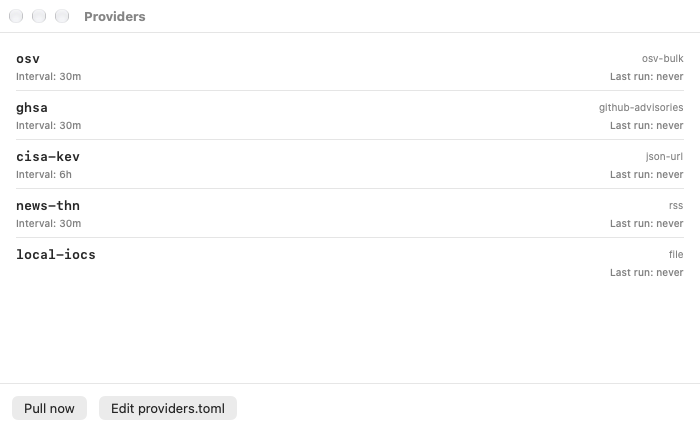
Window layout
The window shows one row per provider. Each row displays:
- Provider ID (bold, monospace, e.g.,
osv,ghsa,cisa-kev) - Type (e.g.,
osv-bulk,github-advisories,json-url) - Interval (e.g.,
30m,6h) - Last run (relative time, e.g., “5 m ago”, “never”)
- Last error (when the last poll failed, shown in red)
Toolbar actions
- Pull now: runs all providers immediately and refreshes the list
- Edit providers.toml: opens
~/Library/Application Support/Buckler/providers.tomlin the default editor
Provider types
Buckler supports seven provider types. Configure them in providers.toml.
osv-bulk
Downloads the OSV bulk archive for selected ecosystems from https://osv-vulnerabilities.storage.googleapis.com/<Ecosystem>/all.zip. Runs locally after download. No inventory leaves the machine.
Example:
[[provider]]
id = "osv"
type = "osv-bulk"
ecosystems = ["PyPI", "npm"]
interval = "30m"
github-advisories
Pulls advisories from the GitHub Advisories API. A token is optional. Without a token, GitHub applies the lower anonymous rate limit. Buckler reads the token from the Keychain item named in token_keychain, else from the GITHUB_TOKEN environment variable.
Example:
[[provider]]
id = "ghsa"
type = "github-advisories"
ecosystems = ["pip", "npm"]
token_keychain = "buckler.github"
interval = "30m"
To add a token:
security add-generic-password -a buckler -s buckler.github -w YOUR_TOKENjson-url
Fetches a JSON file from a URL and parses it with a named parser. The kev parser reads the CISA Known Exploited Vulnerabilities feed.
Example:
[[provider]]
id = "cisa-kev"
type = "json-url"
url = "https://www.cisa.gov/sites/default/files/feeds/known_exploited_vulnerabilities.json"
parser = "kev"
interval = "6h"
rss
Fetches an RSS or Atom feed. Articles go to the LLM for indicator extraction when they pass the keyword prefilter.
Example:
[[provider]]
id = "news-thn"
type = "rss"
url = "https://feeds.feedburner.com/TheHackersNews"
parser = "llm-extract"
interval = "30m"
The keyword prefilter passes articles that contain a watched package name, an installed package from the top 500, or one of these terms: malicious, compromised, backdoor, supply chain, trojanized, typosquat, credential.
file
Reads local JSON or CSV IOC files. The path supports globs.
Example:
[[provider]]
id = "local-iocs"
type = "file"
path = "~/.config/buckler/iocs/*.json"
No interval. Buckler reads the files at every scan.
command
Runs a local command that writes NDJSON Intel records to stdout. This is the extension point. Write a script in any language. Buckler runs it on the configured interval.
Example:
[[provider]]
id = "my-feed"
type = "command"
command = ["/usr/local/bin/my-feed", "--since", "{last_run}"]
interval = "1h"
The {last_run} placeholder expands to the ISO 8601 timestamp of the last successful run.
aikido-intel
Placeholder for the Aikido Intel feed. No public bulk feed exists as of 2026-11-01. Aikido malware reaches OSV bulk as MAL-* records.
Watchlist
The watchlist has two effects:
- Articles that name a watched package skip the keyword prefilter and go to the LLM.
- Advisories with no local match still produce an
advisoryfinding when they name a watched package.
Example:
[watchlist]
packages = ["pkg:pypi/litellm", "pkg:npm/@anthropic-ai/claude-code", "pkg:vscode/anthropic.claude-code"]
repos = ["BerriAI/litellm", "anthropics/claude-code"]
Next
- Settings for intervals and roots
- Reference: providers.toml for full syntax